
Casting & multi-room
Android music player with Sonos, Chromecast & DLNA support
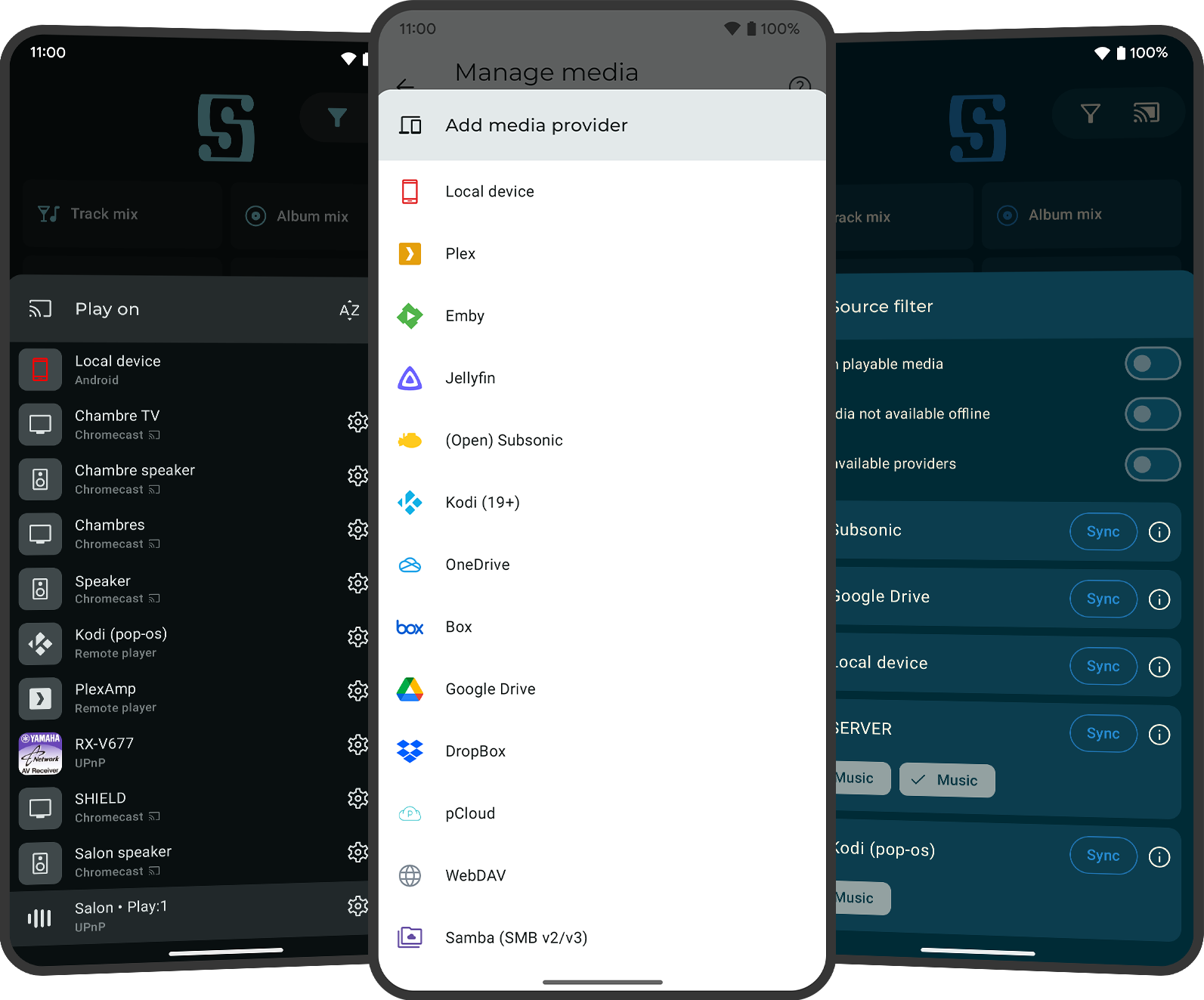
Use Symfonium as the Android control center for your home audio setup while keeping one library and queue workflow. It supports Sonos, Chromecast, UPnP/DLNA, Kodi and Plex/PlexAmp client casting across local, server and cloud sources.
- Free trial on Google Play
- One-time purchase (no subscription)
- No ads, privacy-respecting
Cast from one app, not four
Use the same library, queue and playback habits whether you listen on your phone or send audio to speakers and renderers around the house.
Advanced Sonos support
Symfonium supports Sonos playback with group-aware controls: see grouped devices, join/leave groups, adjust per-speaker volume in groups, and optionally match volume to the group when joining.
Chromecast + UPnP/DLNA + Kodi support
Symfonium supports multiple casting families in one app, including Chromecast, UPnP/DLNA renderers and Kodi. UPnP gapless playback is supported on compatible devices, and Chromecast casting can use transcoding support when needed.
Plex / PlexAmp client casting support
Symfonium supports casting to Plex and PlexAmp clients, including fixes around multi-client scenarios. This is especially useful when you want Plex-based playback targets without giving up Symfonium as your main library app.
Queue controls and renderer behavior settings
You keep multiple media queues, smart queue/flow features and advanced controls while casting. Symfonium also includes renderer-related settings such as an UPnP option to stop casting when external changes are detected.
Common home audio use cases
Typical mixed-device setups where Symfonium is used as the Android controller and day-to-day player.
Keep one app workflow even if your home audio is split between Sonos speakers and Chromecast-capable devices.
Browse a Plex-hosted library in Symfonium, then cast to Chromecast or DLNA/UPnP renderers without changing to a different player UI.
Use offline/local playback on the go, then switch to home casting with the same queues and browsing habits when you get back.
Casting compatibility FAQ
Does Symfonium support Sonos groups and per-speaker volume?
Yes. Symfonium supports Sonos playback with advanced group controls, including grouped device visibility, join/leave group actions and individual speaker volume control inside groups.
Does Symfonium support Chromecast and UPnP/DLNA on Android?
Yes. Symfonium supports Chromecast plus UPnP/DLNA renderers, and also supports Kodi as a target. UPnP gapless playback is available on compatible devices.
Can I cast audio from Plex, Jellyfin, Audiobookshelf, Navidrome, Subsonic or cloud libraries?
Yes. Symfonium can cast while using local files, self-hosted providers and cloud/NAS sources, which is why it works well as a single controller app. See the self-hosted use case page and cloud/NAS use case page for source-specific details.
Does Symfonium support Plex/PlexAmp client casting?
Yes. Symfonium supports Plex/PlexAmp client casting. If clients do not appear, the limiting factor is often Plex client discovery and server/client network visibility rather than your local Symfonium playback setup.
Why can Plex music play locally but fail when casting to Chromecast or DLNA?
This usually means the renderer cannot access the Plex-provided media URL (for example due to routing, DNS, certificate or network-path issues), even though Symfonium can browse and start the request. Symfonium includes proxy-mode options that can help some setups, but results depend on the renderer and network.
What does proxy mode help with in casting setups?
Proxy mode can help some renderer scenarios where the cast target cannot directly reach the server-provided media URL. It is not required for every setup, but it is a useful troubleshooting option for Plex-to-Chromecast or Plex-to-DLNA edge cases.
What is the UPnP setting to stop casting on external changes?
Symfonium includes a UPnP renderer setting to stop casting when external changes are detected (when the renderer supports that behavior). It helps avoid queue desync in some shared-device or externally-controlled renderer situations.
Can Symfonium still be my main player when I am not casting?
Yes. Symfonium remains a full Android music player with offline playback, advanced audio features and rich library browsing, so you do not need one app for casting and another for normal playback.
Download now!
Download Symfonium on Google Play and test Sonos, Chromecast, UPnP/DLNA or Plex/PlexAmp client casting with your own library and devices.
Explore other use cases
Self-hosted servers
Plex, Jellyfin, Audiobookshelf, Subsonic/OpenSubsonic, Navidrome
Cloud + NAS
Cloud drives, SMB (v2/v3) and WebDAV network shares
Audio tuning
PEQ, GEQ, AutoEQ and APO import workflows
Need the broad overview instead? Go to the homepage.