Self-hosted audio
Android player for Plex, Emby, Jellyfin, Kodi, Audiobookshelf, Subsonic/OpenSubsonic & Navidrome
Use one Android player for mixed self-hosted libraries instead of juggling separate apps. Symfonium combines provider-specific compatibility work including Jellyfin Quick Connect, OpenSubsonic improvements and Audiobookshelf support, plus offline caching, advanced queueing and casting to Sonos/Chromecast/DLNA/Plex/PlexAmp targets.
Free trial · One-time purchase · No ads, no subscription
No Google Play? APK / F-Droid · Buy without Google Play
Built for self-hosted servers and mixed audio libraries
Symfonium is designed for real-world setups: multiple servers, some local files, a NAS share, Audiobookshelf for audiobooks, and different playback targets depending on where you listen.
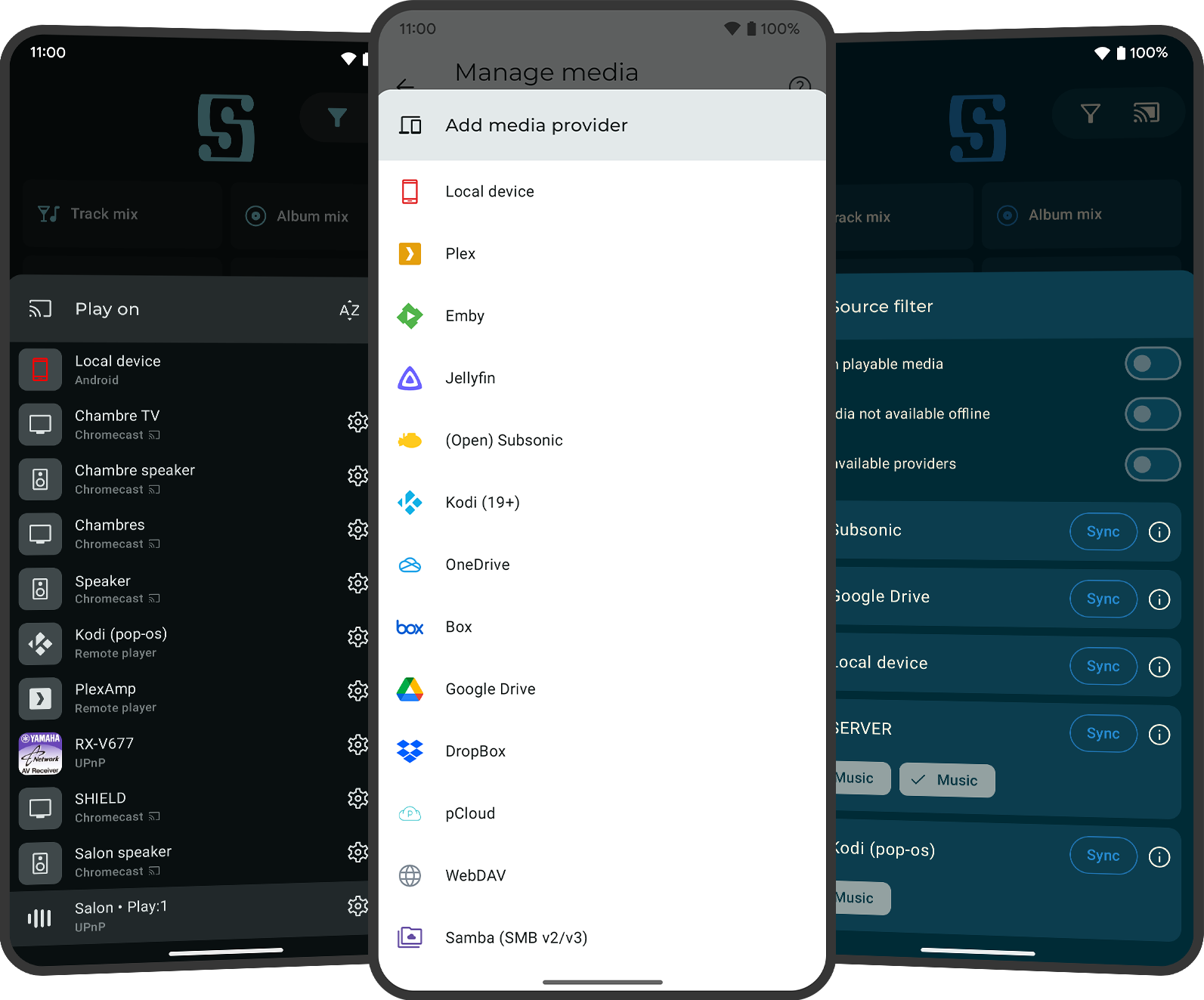
Multi-provider library aggregation
Combine Plex, Emby, Jellyfin, Kodi, Audiobookshelf, Subsonic/OpenSubsonic and Navidrome in one app, and keep local files plus SMB/WebDAV sources available for edge cases or mixed storage habits.
Provider compatibility work beyond basic login
Symfonium includes compatibility fixes and features such as Jellyfin Quick Connect support, Audiobookshelf support, Plex Sonic analysis and DJs, OpenSubsonic transcoding API support, apiKeys and custom headers.
Offline caching and queue resilience
Manual caching, automatic caching and playback cache help keep music available when servers are slow or unreachable.
Casting across server ecosystems
Cast self-hosted music to Sonos (including group controls), Chromecast, UPnP/DLNA, Kodi and Plex/PlexAmp clients from the same app. See the casting use case page for device-specific details.
Common self-hosted use cases
These are common search intents and real setups where Symfonium is used as the single Android controller and player.
Plex + local files on one phone
Use Plex for the main library, keep local downloads or side-loaded albums available, and still use one queue system, one player UI and one set of playback controls.
Audiobookshelf + music server side by side
Keep Audiobookshelf for audiobooks and podcasts while Plex, Jellyfin or Navidrome handle music, then browse everything from one Android app without constantly switching clients.
Home server + offline commute
Sync and cache from your server on Wi-Fi, then rely on offline playback and playback cache while traveling, driving or moving between weak network areas.
Which self-hosted media servers are supported on Android?
Symfonium supports Plex, Emby, Jellyfin, Kodi, Audiobookshelf, Subsonic-compatible servers, OpenSubsonic and Navidrome. You can also combine them with local files, SMB (v2/v3) and WebDAV in the same app.
Does Symfonium support Audiobookshelf?
Yes. Symfonium supports Audiobookshelf as a provider and can use it alongside Plex, Jellyfin, Navidrome or local/NAS sources in the same app.
Does Symfonium support Jellyfin Quick Connect?
Yes. Symfonium includes Jellyfin Quick Connect support and ongoing Jellyfin compatibility fixes.
Does Symfonium work with Navidrome and OpenSubsonic servers?
Yes. Symfonium supports Navidrome and Subsonic/OpenSubsonic servers, including support for newer OpenSubsonic transcoding API capabilities. Older Subsonic servers may still require compatibility-mode tradeoffs depending on their implementation.
Can I use Plex and Jellyfin (or multiple servers) at the same time?
Yes. Symfonium is built for mixed setups and can aggregate multiple providers in one Android player experience, including combinations like Plex + Audiobookshelf + Navidrome plus local/NAS sources.
Can I use local files and NAS shares with my self-hosted servers?
Yes. Symfonium can mix self-hosted servers with local device files, SMB shares and WebDAV, which is useful when part of your collection is not fully migrated to one server yet.
Does it work offline with self-hosted servers?
Yes. Symfonium supports manual and automatic caching plus playback cache. This is useful for commuting or unstable networks, and works well with smart playlists, album/playlist offline workflows and cached audiobooks.
Can I cast server music to Sonos, Chromecast or DLNA/UPnP devices?
Yes. Symfonium supports Sonos, Chromecast, UPnP/DLNA and Kodi targets while keeping queue and library control in the app. For renderer-specific behavior and Sonos group controls, see the casting use case page.
Does Symfonium support Plex managed accounts?
Yes. Symfonium includes fixes for Plex managed-account handling so mixed-family/self-hosted environments are more reliable in day-to-day use.
Does Symfonium support OpenSubsonic transcoding API features?
Yes. Symfonium enabled support for newer OpenSubsonic transcoding API capabilities, which improves compatibility on servers implementing the updated API.
Download
Try every feature free.
Pay once.
Download Symfonium on Google Play and test Plex, Jellyfin, Kodi, Audiobookshelf, Navidrome or Subsonic/OpenSubsonic with your own sync, offline cache and casting setup.
Google Play is recommended for installation and purchase.
Free trial · One-time purchase · No subscription
No Google Play on your device?
For phones, tablets and Android TV. Add our repository to an F-Droid-compatible client or download the APK manually.
Installation guidePayPro Global offers a one-time license for one device. Use the Device ID from Symfonium’s About or purchase screen.
License detailsUse cases