Audio tuning
Android music player with PEQ, GEQ & AutoEQ
Symfonium gives Android power users a real tuning workflow, not just a basic EQ slider. You get PEQ and GEQ, AutoEQ/APO import, ReplayGain, crossfeed, 64-bit local DSP, multiple queue modes and broad source support in one music app.
Free trial · One-time purchase · No ads, no subscription
No Google Play? APK / F-Droid · Buy without Google Play
PEQ, GEQ and AutoEQ inside a real music player
Audio tools matter, but so do queue control, library browsing and source compatibility. Symfonium is built to do both, with local processing handled in its own high-precision DSP path.
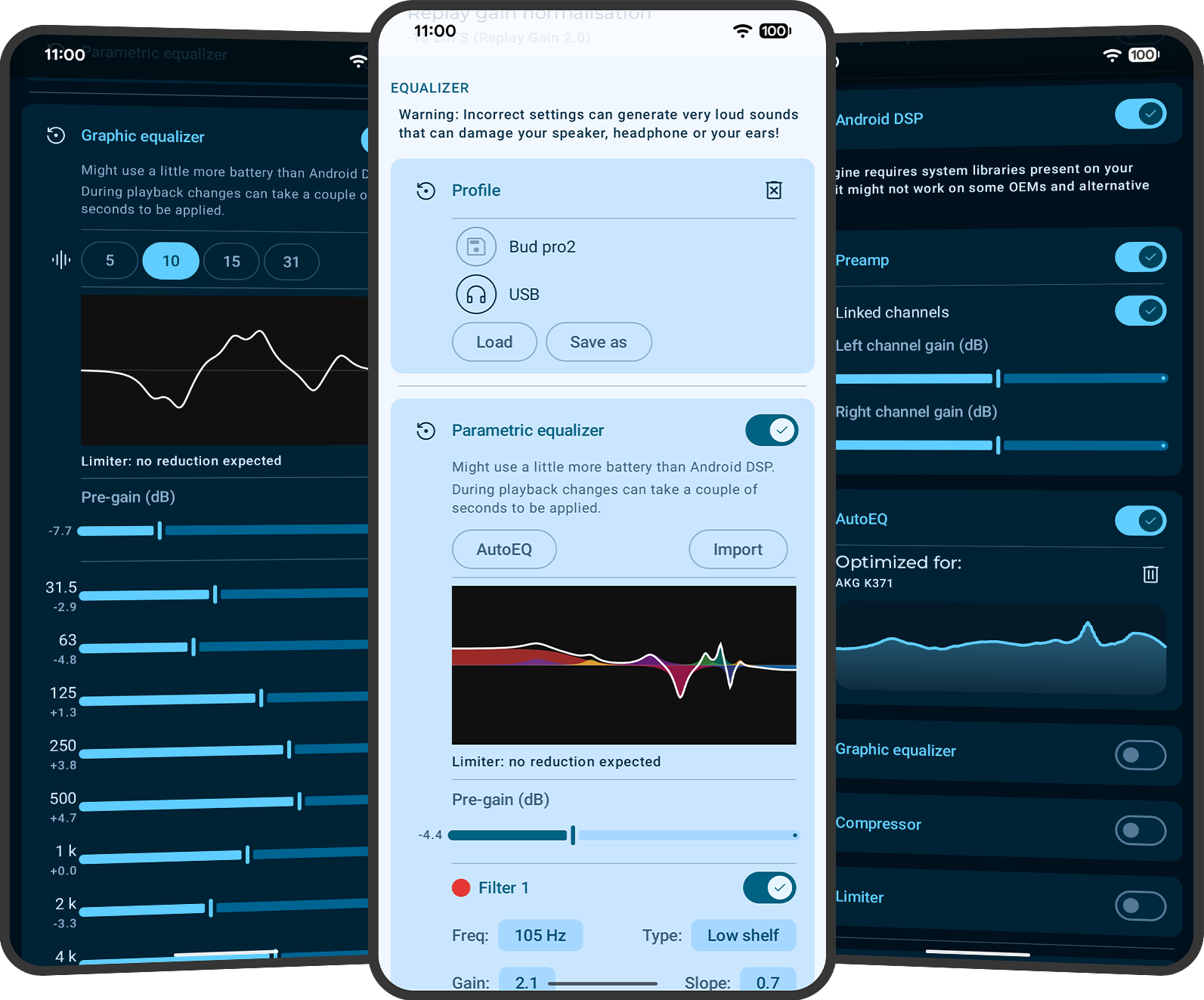
Parametric EQ (PEQ) with expert depth
Symfonium includes a parametric EQ with 10 bands by default and up to 64 bands in expert mode. PEQ filters can target all channels or left/right separately, and the minimum frequency was lowered to 5Hz for deeper low-end tuning.
Graphic EQ (GEQ) without OS-library limits
Symfonium also includes a Graphic EQ (GEQ) with 5, 10, 15 or 31 bands, with an implementation that does not depend on Android OS EQ libraries for the feature set.
AutoEQ/APO import and reusable profiles
The PEQ supports AutoEQ and APO imports, and Symfonium supports multiple equalization profiles so you can keep separate tuning presets for headphones, speakers or listening contexts.
ReplayGain and advanced playback features
ReplayGain, PEQ/GEQ, crossfeed, mono, skip silence, speed and pitch use Symfonium's 64-bit DSP path for local playback. The app also includes native DSD/USB DAC workflows, gapless playback, multiple queues and smart queue/flow options. See the Hi-Res and DSD page for output-path details.
Common audio tuning use cases
These are the kinds of searches and headphone workflows where a basic Android player usually falls short.
Headphone correction with AutoEQ
Import AutoEQ/APO-style settings, tune with PEQ, then keep separate profiles for different headphones instead of re-editing settings every time you switch devices. Crossfeed is also available for a more natural headphone soundstage.
Different listening modes
Use Symfonium profiles and customization to separate commute, desk and audiobook setups while keeping queue behavior, filters and app style changes practical.
One tuning workflow across all sources
Apply the same player and tuning habits when listening to local files, self-hosted libraries or cloud music instead of switching to weaker provider-specific apps. Actual output still depends on the device, DAC, file and provider behavior.
Does Symfonium support parametric EQ (PEQ) on Android?
Yes. Symfonium includes a Parametric Equalizer (PEQ) with 10 bands by default and up to 64 bands in expert mode.
Does Symfonium include a graphic EQ (GEQ) with 31 bands?
Yes. Symfonium includes a Graphic Equalizer (GEQ) with 5, 10, 15 or 31 bands, making it useful for users who prefer a classic band-based EQ workflow.
Can I import AutoEQ or APO profiles?
Yes. Symfonium supports AutoEQ and APO imports in the PEQ workflow, so you can start from a known profile and fine-tune from there.
Can I target left or right channel separately in PEQ?
Yes. Symfonium supports channel selection for PEQ filters (all channels, left only or right only), which is useful for channel imbalance correction and fine tuning.
How low can PEQ filters go in Symfonium?
Symfonium lowered the PEQ minimum frequency to 5Hz, which gives more room for low-end correction or filter setups that need sub-bass tuning ranges.
Does ReplayGain work in Hi-Res mode?
Yes. ReplayGain now runs in Symfonium's own 64-bit local DSP path, alongside PEQ/GEQ, crossfeed and other playback processing.
Can I combine PEQ or AutoEQ with Hi-Res, DSD and USB DAC playback?
Yes. Symfonium combines advanced tuning with its Hi-Res audio engine, including PEQ, GEQ, AutoEQ/APO import, ReplayGain, crossfeed, 64-bit local DSP and per-device output settings. For playback-path details, see the Hi-Res and DSD page.
Can I save different tuning setups for different headphones or situations?
Yes. Symfonium supports multiple equalization profiles, and the broader app also supports profiles/customization workflows that help separate listening modes (for example commute vs desk vs audiobook use).
Do PEQ/GEQ/AutoEQ features work with Plex, Jellyfin, Audiobookshelf, Navidrome or cloud libraries?
Yes. Symfonium is designed as one player across local, self-hosted and cloud providers, so the tuning workflow is not limited to local files. For source-specific details, see the self-hosted use case page and cloud/NAS use case page.
Download
Try every feature free.
Pay once.
Download Symfonium on Google Play and test PEQ, GEQ, AutoEQ and 64-bit DSP with your own headphones, local library or server/cloud setup.

Google Play is recommended for installation and purchase.
Free trial · One-time purchase · No subscription
No Google Play on your device?
For phones, tablets and Android TV. Add our repository to an F-Droid-compatible client or download the APK manually.
Installation guidePayPro Global offers a one-time license for one device. Use the Device ID from Symfonium’s About or purchase screen.
License detailsUse cases
Explore other use cases
- Plex / Jellyfin / Kodi / Navidrome Plex, Jellyfin, Kodi, Audiobookshelf, Subsonic/OpenSubsonic, Navidrome
- Cloud drives / NAS Google Drive, OneDrive, Dropbox, Box, pCloud, SMB and WebDAV
- Hi-Res / DSD / USB DAC Hi-Res PCM, native DSD, DoP, USB DACs and Android DAPs
- Sonos / Chromecast / DLNA Sonos, Chromecast, DLNA/UPnP, Kodi and more