
Audio tuning
Android music player with PEQ, GEQ & AutoEQ
Symfonium gives Android power users a real tuning workflow, not just a basic EQ slider. You get PEQ and GEQ, AutoEQ/APO import, ReplayGain (including Hi-Res), multiple queue modes and broad source support in one music app.
- Free trial on Google Play
- One-time purchase (no subscription)
- No ads, privacy-respecting
PEQ, GEQ and AutoEQ on a real music player
Audio tools matter, but so do queue control, library browsing and source compatibility. Symfonium is built to do both.
Parametric EQ (PEQ) with expert depth
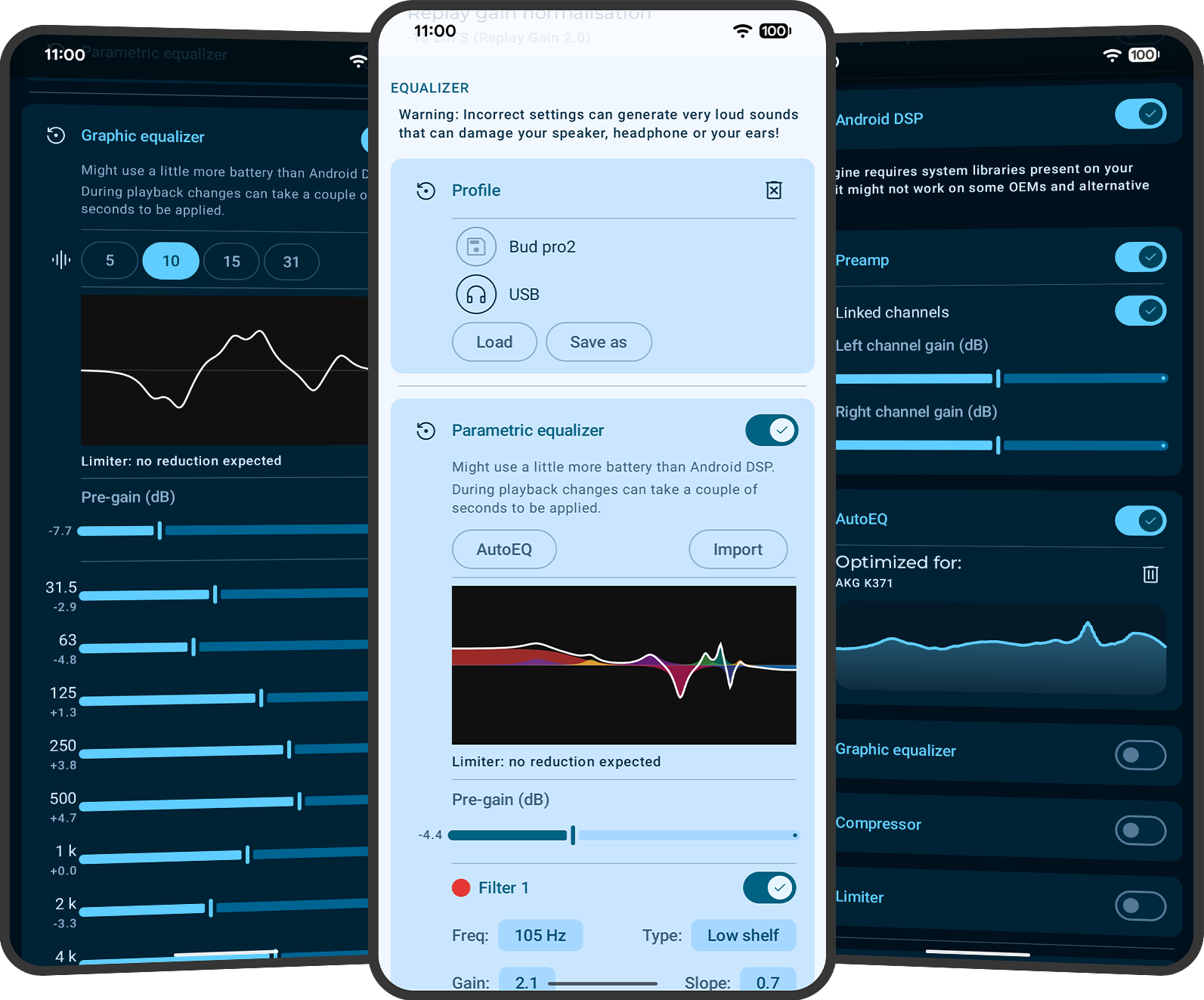
Symfonium includes a parametric EQ with 10 bands by default and up to 64 bands in expert mode. PEQ filters can target all channels or left/right separately, and the minimum frequency was lowered to 5Hz for deeper low-end tuning.
Graphic EQ (GEQ) without OS-library limits
Symfonium also includes a Graphic EQ (GEQ) with 5, 10, 15 or 31 bands, with an implementation that does not depend on Android OS EQ libraries for the feature set.
AutoEQ/APO import and reusable profiles
The PEQ supports AutoEQ and APO imports, and Symfonium supports multiple equalization profiles so you can keep separate tuning presets for headphones, speakers or listening contexts.
ReplayGain and advanced playback features
ReplayGain works in Hi-Res mode, and Symfonium also includes gapless playback, multiple queues, smart queue/flow options and advanced crossfade modes to keep tuning usable in day-to-day listening.
Common audio tuning use cases
These are the kinds of searches and headphone workflows where a basic Android player usually falls short.
Import AutoEQ/APO-style settings, tune with PEQ, then keep separate profiles for different headphones instead of re-editing settings every time you switch devices.
Use Symfonium profiles and customization to separate commute, desk and audiobook setups while keeping queue behavior, filters and app style changes practical.
Apply the same player and tuning habits when listening to local files, self-hosted libraries or cloud music instead of switching to weaker provider-specific apps.
PEQ / AutoEQ FAQ
Does Symfonium support parametric EQ (PEQ) on Android?
Yes. Symfonium includes a Parametric Equalizer (PEQ) with 10 bands by default and up to 64 bands in expert mode.
Does Symfonium include a graphic EQ (GEQ) with 31 bands?
Yes. Symfonium includes a Graphic Equalizer (GEQ) with 5, 10, 15 or 31 bands, making it useful for users who prefer a classic band-based EQ workflow.
Can I import AutoEQ or APO profiles?
Yes. Symfonium supports AutoEQ and APO imports in the PEQ workflow, so you can start from a known profile and fine-tune from there.
Can I target left or right channel separately in PEQ?
Yes. Symfonium supports channel selection for PEQ filters (all channels, left only or right only), which is useful for channel imbalance correction and fine tuning.
How low can PEQ filters go in Symfonium?
Symfonium lowered the PEQ minimum frequency to 5Hz, which gives more room for low-end correction or filter setups that need sub-bass tuning ranges.
Does ReplayGain work in Hi-Res mode?
Yes. Symfonium supports ReplayGain in Hi-Res mode in addition to its other advanced playback features.
Can I save different tuning setups for different headphones or situations?
Yes. Symfonium supports multiple equalization profiles, and the broader app also supports profiles/customization workflows that help separate listening modes (for example commute vs desk vs audiobook use).
Do PEQ/GEQ/AutoEQ features work with Plex, Jellyfin, Audiobookshelf, Navidrome or cloud libraries?
Yes. Symfonium is designed as one player across local, self-hosted and cloud providers, so the tuning workflow is not limited to local files. For source-specific details, see the self-hosted use case page and cloud/NAS use case page.
Download now!
Download Symfonium on Google Play and test PEQ, GEQ and AutoEQ with your own headphones, local library or server/cloud setup.

Explore other use cases
Self-hosted servers
Plex, Jellyfin, Audiobookshelf, Subsonic/OpenSubsonic, Navidrome
Cloud + NAS
Cloud drives, SMB (v2/v3) and WebDAV network shares
Casting
Sonos, Chromecast, DLNA/UPnP, Kodi and more
Need the broad overview instead? Go to the homepage.