
Cloud + local music
Android cloud music player for Google Drive, OneDrive, Dropbox, SMB & WebDAV
Symfonium is built for mixed storage setups: cloud drives, NAS shares and local files in one Android app. You keep real player features (queueing, offline caching, tuning and casting) instead of falling back to a basic file browser.
- Free trial on Google Play
- One-time purchase (no subscription)
- No ads, privacy-respecting
One app for cloud drives, NAS shares and local files
Symfonium combines cloud/NAS compatibility with features usually reserved for premium local players.
Cloud + network provider coverage
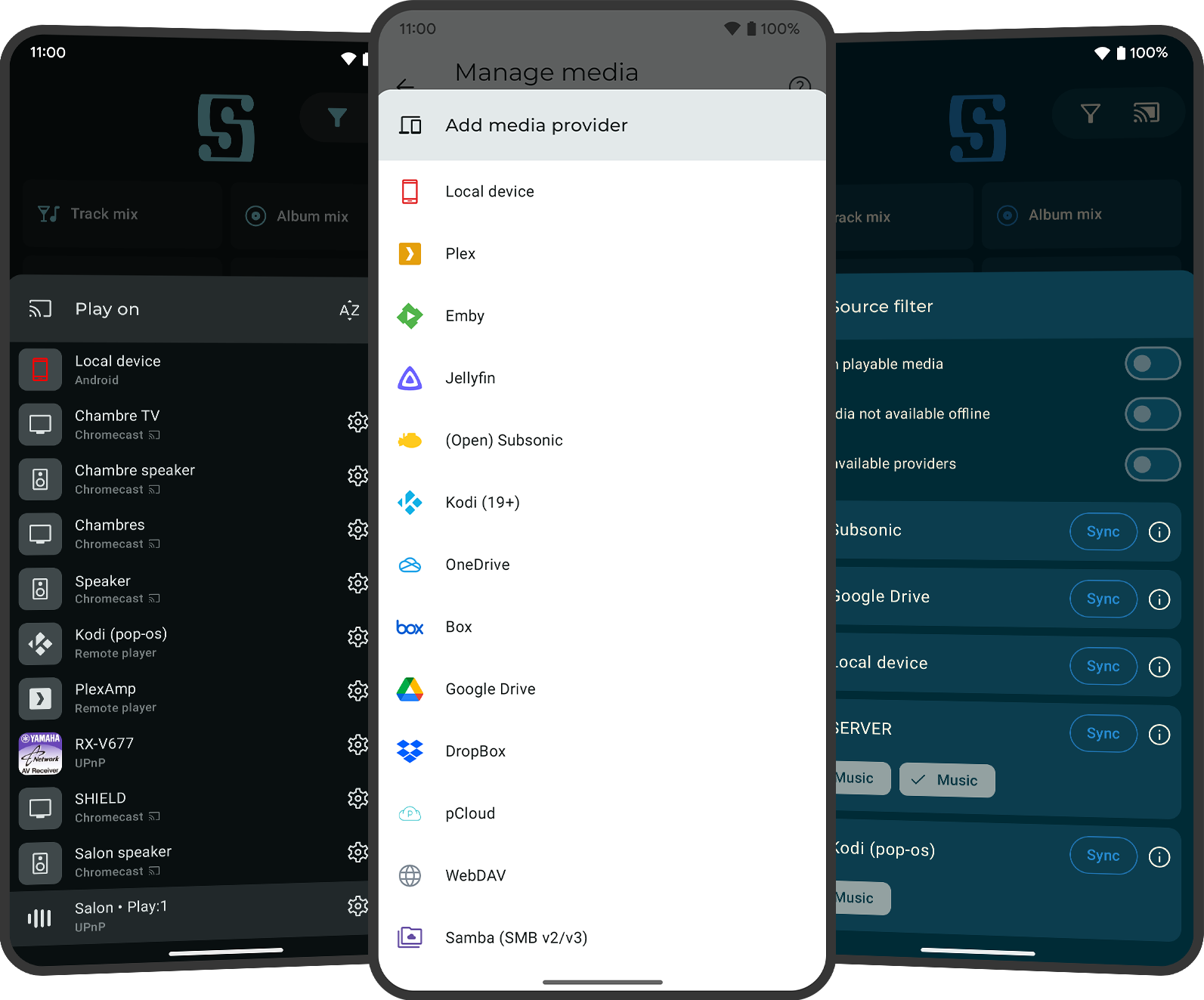
Symfonium supports Google Drive, OneDrive, Dropbox, Box and pCloud, plus SMB (v2/v3) and WebDAV. You can mix these with local files and, if needed, self-hosted providers in the same app.
Metadata parsing and music-specific browsing
Symfonium uses a music-oriented tag parser and metadata workflow instead of a plain file explorer experience. For providers like Google Drive, the app can play, cast and offline-cache media while building a real music library view.
Offline caching and unstable-network resilience
Manual and automatic caching plus playback cache help avoid interruptions on weak connections. For large cloud libraries, initial metadata extraction and tag parsing is best done on Wi-Fi for speed and battery reasons.
Advanced audio + casting across cloud sources
You still get advanced player features like PEQ/GEQ/AutoEQ support, ReplayGain, multiple queues and casting to Sonos/Chromecast/DLNA instead of losing features because your files live in the cloud.
Common cloud and NAS use cases
Typical searches and setups where users need more than a local-only Android player.
Use SMB or WebDAV from a NAS when at home, then rely on manual/automatic caching and playback cache when you leave Wi-Fi coverage.
Keep music in Google Drive, OneDrive or Dropbox and still get queue control, artwork, lyrics, EQ and casting instead of a generic document browser workflow.
Combine phone storage, cloud folders and SMB/WebDAV shares in one app while keeping one browsing and playback experience.
Cloud and NAS FAQ
Which cloud providers does Symfonium support for music playback?
Symfonium supports Google Drive, OneDrive, Dropbox, Box and pCloud (subject to provider API changes). It is designed as a music player workflow, not just a generic cloud file browser.
Does Symfonium work with Google Drive for play, cast and offline cache?
Yes. Symfonium supports Google Drive as a media provider and can play, cast and cache music offline. It also builds a music library view using metadata/tag parsing, which is why initial setup may take longer than a simple file browser app.
Does Symfonium work with NAS shares over SMB or WebDAV?
Yes. Symfonium supports SMB (v2/v3) and WebDAV, which covers many NAS and home-server setups. SMB provider fixes also include edge cases such as custom port handling.
What WebDAV authentication methods are supported?
Symfonium supports Basic and Digest authentication for WebDAV. If a server still fails to log in, the cause is often server-side auth configuration (for example realm/auth settings), so checking server logs is usually the fastest way to diagnose it.
Can I cache music for offline playback?
Yes. Symfonium supports manual and automatic caching, plus playback cache for smoother playback on unstable connections. This is useful for cloud and NAS setups where connectivity is inconsistent.
Should I do the first cloud-library sync on Wi-Fi?
Yes, that is recommended for larger libraries. Initial metadata extraction and tag parsing can require more downloads and processing than later incremental syncs, so Wi-Fi is usually faster and more battery-friendly.
Can I mix local files, cloud providers and NAS shares in one app?
Yes. Symfonium is built for mixed-source libraries, so you can combine local files, cloud providers, SMB/WebDAV and even self-hosted servers. See the self-hosted use case page if you also use Plex/Jellyfin/Audiobookshelf/Navidrome/Subsonic.
Can I still use advanced EQ and casting with cloud sources?
Yes. Symfonium keeps advanced player features available when using cloud/NAS sources, including tuning workflows and casting targets. For deeper details, see the PEQ/AutoEQ use case page and casting use case page.
Download now!
Download Symfonium on Google Play and test your cloud/NAS setup with Google Drive, OneDrive, Dropbox, SMB/WebDAV and local files in one player.
Explore other use cases
Self-hosted servers
Plex, Jellyfin, Audiobookshelf, Subsonic/OpenSubsonic, Navidrome
Audio tuning
PEQ, GEQ, AutoEQ and APO import workflows
Casting
Sonos, Chromecast, DLNA/UPnP, Kodi and more
Need the broad overview instead? Go to the homepage.